Already charged? Stop the renewal first, then use the receipt to check the refund window and support path.
Check this Nintendo Switch Online charge →How to Cancel Nintendo Switch Online Before It Renews (2026)
Nintendo treats cancellation as turning off automatic renewal. The membership keeps working until its expiration date, but Nintendo says automatic renewal must be stopped at least 48 hours before that date.
Official account or cancellation path Nintendo Switch Online
Confirm which Nintendo Account bought the plan
Check the membership receipt and sign in with the Nintendo Account that purchased the individual or family membership. Other family-group accounts cannot change that payment.
Turn off renewal on the Switch console
Open Nintendo eShop with the purchasing account. Select the user icon in the upper-right corner, open Account Information, choose Nintendo Switch Online, and turn off automatic renewal.
Or cancel from the Nintendo Account website
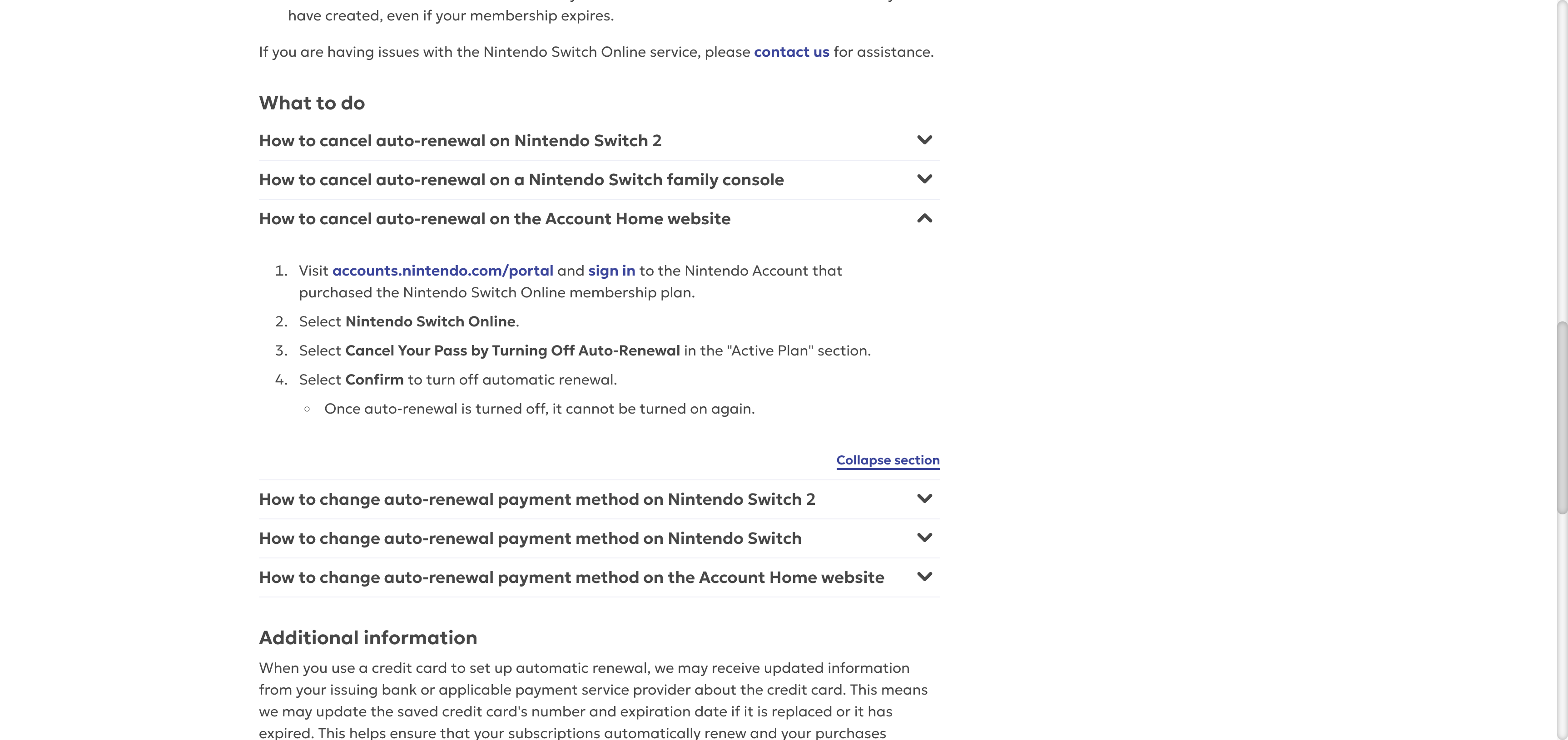
Sign in at accounts.nintendo.com/portal. Open Nintendo Switch Online, choose the active plan, select Cancel pass by turning off automatic renewal, and confirm.
Already charged? Keep the receipt and the cancellation confirmation. They are the useful part of a refund request.
Check my Nintendo Switch Online refund options →Record the expiration date
Make sure the account shows automatic renewal as off and save the confirmation. Check any online play, cloud backup, or game-library feature you rely on before the membership expires.
⚠️ Watch out
- Nintendo says automatic renewal must be stopped at least 48 hours before the membership expires.
- The current US support policy does not provide refunds or credits for time remaining after cancellation.
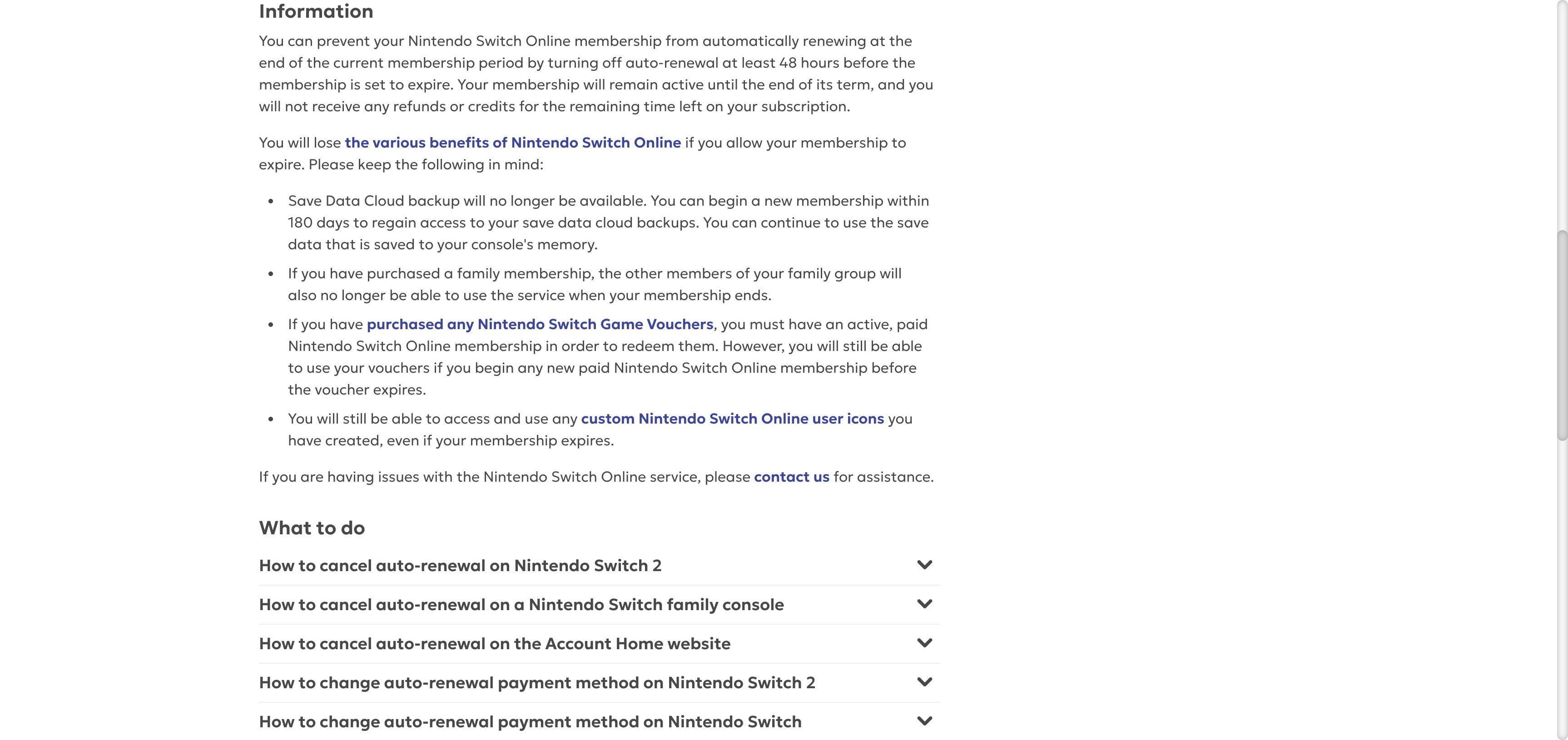
- Save Data Cloud backup stops after expiration. Nintendo says a new membership started within 180 days can restore access to the cloud backups, while saves stored on the console remain available.
- When a family membership ends, the other members of the family group also lose the service.
- A seven-day free trial changes to a paid membership unless automatic renewal is stopped before the trial ends.
- For a family membership, use the Nintendo Account that purchased the plan.
✗ Refund policy
Nintendo's current US support page says it does not provide refunds or credits for remaining membership time. If the charge was unauthorized or local law applies, contact Nintendo support with the receipt and account details.
Official screens behind the policy notes
These current support screens are included so you can compare the wording on your own account before acting.
Frequently Asked Questions
Does Nintendo Switch Online stop immediately when I cancel?
Can I get a refund for unused Nintendo Switch Online time?
How do I stop a seven-day free trial from charging me?
Why can I not turn off renewal from my account?
Sources checked for this guide
We checked Nintendo of America's current cancellation and free-trial pages on August 25, 2026. Menu names and consumer rights can differ by region.
Already charged for Nintendo Switch Online?
Enter the amount and what happened. The free preview organizes the known cancel path, likely refund window, and the evidence to keep before you contact support.
The preview is free. The optional personalized Emergency Kit is a one-time $4.99 purchase. Or review a bill if you are unsure which charge to handle first.
Independent guidance
Bill Vampire is not a bank or law firm. Cancel paths and merchant policies can change. Contact the merchant first for an ordinary billing problem. Contact your card issuer promptly if you do not recognize a charge or believe it is fraudulent.